AI · 7 min ·
Building Voice Agents at Scale
Why low latency, smart orchestration, and good architecture matter more than the model itself.
Table of Contents
Introduction
Over the last few months, I've spent a lot of time researching voice agents and trying to understand what separates a simple demo from a production-grade system.
At first glance, voice AI looks straightforward:
User speaks → AI thinks → AI replies.
But once you start building real systems, you quickly realize that voice agents are fundamentally a latency problem disguised as an AI problem.
Users don't care how smart your model is if it pauses for three seconds after every sentence.
The challenge isn't just intelligence.
It's:
- Speed
- Natural conversation
- Interruptions
- Tool calls
- Reliability
- Scalability
- Cost
After studying different systems and architectures, I found that almost every production voice application falls into one of two categories.
Why Voice Agents Are Different
Text users are patient.
Voice users are not.
When using ChatGPT through text, waiting 5 seconds for an answer feels acceptable.
But in voice conversations, even a one-second pause feels strange.
Humans naturally expect:
- Immediate acknowledgement
- Smooth turn-taking
- Interruptions
- Emotional tone
- Continuous flow
Because of this, voice systems have very different constraints compared to text agents.
For voice agents:
Latency is part of the product.
Two Ways to Build Voice Agents
Today, there are two dominant architectures.
1. Chained Architecture (STT → LLM → TTS)
This is the classic approach.
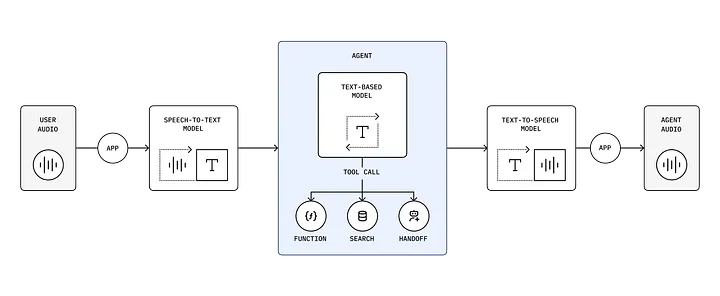
Each component does one job:
STT
Converts speech into text.
Examples:
- Whisper
- Deepgram
- AssemblyAI
LLM
Understands the request and decides what to do.
Examples:
- GPT-4o
- Gemini
- Claude
- Qwen
TTS
Converts text back into audio.
Examples:
- ElevenLabs
- Cartesia
- OpenAI TTS
Advantages
- Easy to debug. Every stage is separate, so failures are easy to inspect.
- Vendor flexibility. Swap STT, LLM, or TTS providers independently.
- Better auditability. Everything becomes text internally, so logs and transcripts are simple.
- Enterprise-friendly. Healthcare, finance, and legal teams usually prefer this.
Disadvantages
- Latency adds up. STT, LLM, and TTS each add a network call, and the system waits for each stage before starting the next.
- More moving parts. More services means more failures and more monitoring.
- Less natural conversation. Turn-taking feels stiff when every turn is a full round trip.
2. Speech-to-Speech Models
Instead of separate systems, one realtime model handles everything.
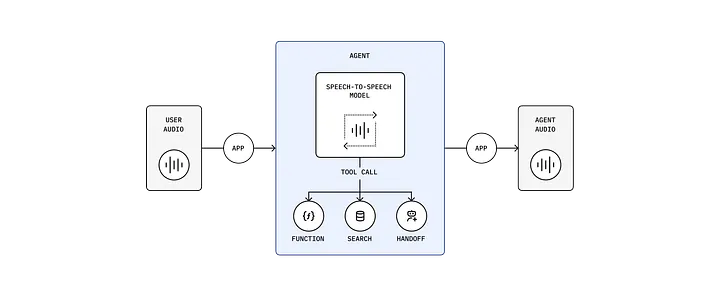
There's no explicit transcription or TTS stage. The model listens, reasons, and speaks inside a single session.
Advantages
- Lower latency. Fewer network hops.
- More human conversations. Speech flows naturally.
- Better interruptions. Users can cut the assistant off mid-sentence.
- Simpler architecture. Much less glue code.
Disadvantages
- Harder to debug. You lose the intermediate text layer.
- Less transparent. Understanding why something failed gets harder.
- All-in on one model. Quality depends entirely on the realtime model.
Comparing Both Approaches
| Factor | Chained Pipeline | Speech-to-Speech | | -------------------- | ---------------- | ---------------- | | Latency | Medium | Low | | Flexibility | Excellent | Moderate | | Debugging | Easy | Hard | | Natural Feel | Good | Excellent | | Compliance | Excellent | Moderate | | Interruptions | Difficult | Excellent | | Complexity | Higher | Lower | | Enterprise Use Cases | Strong | Medium | | Consumer Apps | Medium | Excellent |
Choosing the Right Architecture for Different Businesses
Different products optimize for different things.
Consumer Apps
AI companions, tutors, customer support, travel assistants.
These optimize for natural speech, fast response, and emotional tone — so speech-to-speech usually wins.
Regulated Industries
Clinical assistants, healthcare documentation, financial services.
These optimize for accuracy, auditability, and compliance. You need a transcript of what was said and why the system acted, which is exactly what the chained pipeline gives you for free.
Designing Voice Agents for Thousands of Users
Many people assume:
One giant agent handles everything.
In reality, that's usually a bad design.
The best systems separate:
- Conversation
- Routing
- Tool execution
- Heavy reasoning
The Triage Architecture Pattern
Instead of using one huge agent, use a lightweight front agent.
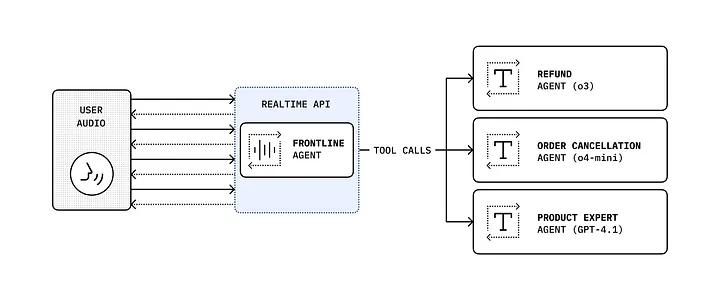
The frontline agent handles conversation and routing only. Behind it sits whatever set of specialists your domain needs:
- Search agent
- Calendar agent
- CRM agent
- Memory agent
- Medical agent
- Knowledge agent
The voice model stays fast.
Heavy work happens elsewhere.
Think of the voice agent as the receptionist.
Specialized agents are the experts.
How to Handle Slow Tool Calls
One of the worst experiences in voice AI is silence.
Imagine asking:
"Can you compare all flights to Tokyo next month?"
If the system freezes for five seconds, users think it crashed.
Instead, buy yourself time.
Examples:
- "Let me check that for you."
- "Give me a second while I look that up."
- "I'm pulling that information right now."
These small phrases dramatically improve user experience.
The voice model stays responsive while heavier models work in the background.
Smart Tool Calling
Bad architecture:
Voice Model
    ↓
Tool A
    ↓
Wait
    ↓
Tool B
    ↓
Wait
    ↓
Tool C
Everything becomes slow.
Better architecture:
Voice Model
      ↓
Parallel Execution
 ├── Tool A
 ├── Tool B
 └── Tool C
Since many tools are independent, running them simultaneously reduces latency significantly. Three sequential calls of 1s, 2s, and 3s cost you six seconds. Run them in parallel and you pay max(A, B, C) — three seconds.
In text, that's a nice optimization. In voice, it's the difference between a conversation and a hold queue.
Local Models vs API Models
This is one of the biggest tradeoffs.
API models give you better intelligence, faster iteration, and no infrastructure to run — at the cost of network latency and per-call spend.
Local models give you lower latency, privacy, and offline support — at the cost of GPUs and the operational work that comes with them.
A Hybrid Strategy Works Best
Use local models for:
- Intent classification
- Routing
- Sentiment analysis
Use API models for:
- Complex reasoning
- Knowledge retrieval
- Long conversations
The same logic applies within a single request: start small, escalate to a medium model when the small one isn't confident, and reach for your most expensive model only when the task actually demands it. Not every "what time is my meeting" needs frontier reasoning.
Model Colocation: An Underrated Optimization
Many people focus only on model size.
But network latency often matters more.
Imagine:
STT → US-East
LLM → Europe
TTS → Asia
Even fast models become slow.
A better design:
STT
LLM
TTS

(all inside the same region)
Benefits:
- Fewer network hops
- Faster responses
- Lower overall latency
Sometimes colocating models saves more time than upgrading hardware.
Observability, Evals, and Guardrails
Production AI systems require visibility.
Track:
- Latency — response time, tool execution time
- Quality — hallucination rate, task completion rate
- Reliability — failure rate, retry rate
- User experience — conversation success, escalations
Guardrails
Protect against:
- Unsafe actions
- Wrong tool usage
- Sensitive data leaks
Guardrails matter even more in healthcare and finance.
Production Metrics That Matter
Good voice systems aim for:
| Metric | Target | | ------------------------- | ------------- | | First acknowledgement | < 300 ms | | First spoken response | < 800 ms | | Full response | 1–2 seconds | | Tool calls | < 500 ms | | Conversation success rate | Above 95% |
Final Thoughts
After researching many architectures, one thing became clear:
Voice agents are not won by the smartest model.
They're won by:
- Lower latency
- Better orchestration
- Good observability
- Proper guardrails
- Smart tool execution
The future of voice AI probably isn't one giant model doing everything.
Instead, it will look more like a team:
- One fast conversational layer.
- Multiple specialized agents.
- Parallel tools.
- Heavy reasoning only when necessary.
Because in voice AI, users don't experience your architecture.
They experience the pauses.